

Recently a friend approached me with the below issue. How do you compare if the applicant has all the 3 required qualifications?
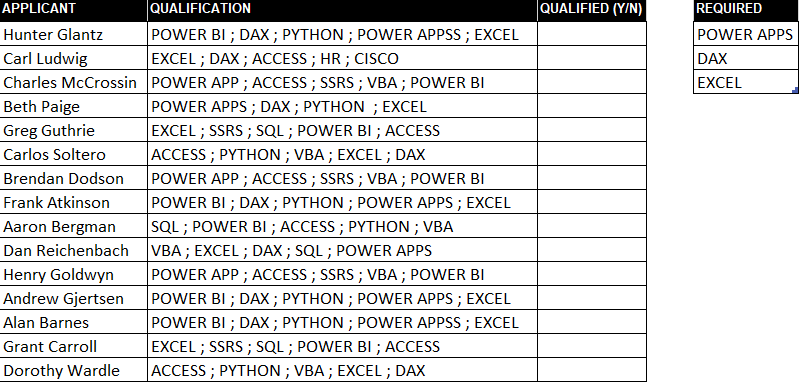
Using a formula
How the formula works:
SEARCH($G$3:$G$5,C3) checks the required skills among the applicant skills and returns the start position of each skill or an #VALUE error if the skill is not found {1;#VALUE!;36}
ISNUMBER(SEARCH($G$3:$G$5,C3)) Checks if the returned array by SEARCH is a number and returns TRUE else FALSE {TRUE;FALSE;TRUE}
ISNUMBER(SEARCH($G$3:$G$5,C3))+0) add zero to convert the TRUE / FALSE to 1/0 {1;0;1}
Sum the 1/0 array to return the met qualifications SUM(ISNUMBER(SEARCH($G$3:$G$5,C3))+0)
Using a User-defined LAMBDA Function
=LAMBDA(string,rqd,
LET( chars, SUM(ISNUMBER(SEARCH(rqd,string))+0)=3, IF(chars,”Y”,”N”) )
)
Using Power Query
Step 1: Get the Applicants & Requirements table to Power Query and load them back as a connection only.

3. Add a new column to Applicants Table that counts the partial match in a string
= Table.AddColumn(
Source,”QUALIFIED”, each
List.Accumulate(
REQUIREMENTS,
0,
(state,current)=>
try if state+1=3 then “Y” else if Text.Contains([QUALIFICATION],current) then state+1 else “N” otherwise “N”
)
)
If you are not familiar with List. Accumulate Function in PowerQuery, Please Watch this Video by Chadeep and Read this article REZA RAD
Thanks to Guido Hendrickx on LinkedIn, we can simplify the above power query formula by using List. Intersect
= Table.AddColumn(Source, “QUALIFIED”, each
if List.Count(List.Intersect(
{
Text.Split([QUALIFICATION], ” ; “)
, Requirements
} ))=3
then “Y” else “N”)
RESOURCES


Recent Comments